Human Resources Software - Page 57
Human Resource software, also known as Human Resource Information Software (HRIS) or HR Systems, is essential for managing employee data. With HR software, you can efficiently organize contact details, department information, attendance records, salary details, training programs, benefits, and more. HRMS systems also seamlessly integrate with applicant tracking and payroll software, streamlining your HR processes. In Canada, HR Management software is closely related to Applicant Tracking software, Payroll software, Performance Appraisal software, and Workforce Management software. Explore a wide range of HR software options available in Canada to optimize your human resource management. Read more Read less


Features
- Performance Management
- Applicant Tracking Software
- Compensation Management Software
- Employee Management
- Recruitment Management
- Benefits Management
- Time & Attendance
- Payroll Management
- Onboarding Software

Features
- Performance Management
- Applicant Tracking Software
- Compensation Management Software
- Employee Management
- Recruitment Management
- Benefits Management
- Time & Attendance
- Payroll Management
- Onboarding Software

Features
- Performance Management
- Applicant Tracking Software
- Compensation Management Software
- Employee Management
- Recruitment Management
- Benefits Management
- Time & Attendance
- Payroll Management
- Onboarding Software

Features
- Performance Management
- Applicant Tracking Software
- Compensation Management Software
- Employee Management
- Recruitment Management
- Benefits Management
- Time & Attendance
- Payroll Management
- Onboarding Software

Features
- Performance Management
- Applicant Tracking Software
- Compensation Management Software
- Employee Management
- Recruitment Management
- Benefits Management
- Time & Attendance
- Payroll Management
- Onboarding Software

Features
- Performance Management
- Applicant Tracking Software
- Compensation Management Software
- Employee Management
- Recruitment Management
- Benefits Management
- Time & Attendance
- Payroll Management
- Onboarding Software

Features
- Performance Management
- Applicant Tracking Software
- Compensation Management Software
- Employee Management
- Recruitment Management
- Benefits Management
- Time & Attendance
- Payroll Management
- Onboarding Software

Features
- Performance Management
- Applicant Tracking Software
- Compensation Management Software
- Employee Management
- Recruitment Management
- Benefits Management
- Time & Attendance
- Payroll Management
- Onboarding Software

Features
- Performance Management
- Applicant Tracking Software
- Compensation Management Software
- Employee Management
- Recruitment Management
- Benefits Management
- Time & Attendance
- Payroll Management
- Onboarding Software

Features
- Performance Management
- Applicant Tracking Software
- Compensation Management Software
- Employee Management
- Recruitment Management
- Benefits Management
- Time & Attendance
- Payroll Management
- Onboarding Software

Features
- Performance Management
- Applicant Tracking Software
- Compensation Management Software
- Employee Management
- Recruitment Management
- Benefits Management
- Time & Attendance
- Payroll Management
- Onboarding Software

Features
- Performance Management
- Applicant Tracking Software
- Compensation Management Software
- Employee Management
- Recruitment Management
- Benefits Management
- Time & Attendance
- Payroll Management
- Onboarding Software

Features
- Performance Management
- Applicant Tracking Software
- Compensation Management Software
- Employee Management
- Recruitment Management
- Benefits Management
- Time & Attendance
- Payroll Management
- Onboarding Software

Features
- Performance Management
- Applicant Tracking Software
- Compensation Management Software
- Employee Management
- Recruitment Management
- Benefits Management
- Time & Attendance
- Payroll Management
- Onboarding Software

Features
- Performance Management
- Applicant Tracking Software
- Compensation Management Software
- Employee Management
- Recruitment Management
- Benefits Management
- Time & Attendance
- Payroll Management
- Onboarding Software

Features
- Performance Management
- Applicant Tracking Software
- Compensation Management Software
- Employee Management
- Recruitment Management
- Benefits Management
- Time & Attendance
- Payroll Management
- Onboarding Software

Features
- Performance Management
- Applicant Tracking Software
- Compensation Management Software
- Employee Management
- Recruitment Management
- Benefits Management
- Time & Attendance
- Payroll Management
- Onboarding Software

Features
- Performance Management
- Applicant Tracking Software
- Compensation Management Software
- Employee Management
- Recruitment Management
- Benefits Management
- Time & Attendance
- Payroll Management
- Onboarding Software

Features
- Performance Management
- Applicant Tracking Software
- Compensation Management Software
- Employee Management
- Recruitment Management
- Benefits Management
- Time & Attendance
- Payroll Management
- Onboarding Software

Features
- Performance Management
- Applicant Tracking Software
- Compensation Management Software
- Employee Management
- Recruitment Management
- Benefits Management
- Time & Attendance
- Payroll Management
- Onboarding Software

Features
- Performance Management
- Applicant Tracking Software
- Compensation Management Software
- Employee Management
- Recruitment Management
- Benefits Management
- Time & Attendance
- Payroll Management
- Onboarding Software

Features
- Performance Management
- Applicant Tracking Software
- Compensation Management Software
- Employee Management
- Recruitment Management
- Benefits Management
- Time & Attendance
- Payroll Management
- Onboarding Software

Features
- Performance Management
- Applicant Tracking Software
- Compensation Management Software
- Employee Management
- Recruitment Management
- Benefits Management
- Time & Attendance
- Payroll Management
- Onboarding Software

Features
- Performance Management
- Applicant Tracking Software
- Compensation Management Software
- Employee Management
- Recruitment Management
- Benefits Management
- Time & Attendance
- Payroll Management
- Onboarding Software

Features
- Performance Management
- Applicant Tracking Software
- Compensation Management Software
- Employee Management
- Recruitment Management
- Benefits Management
- Time & Attendance
- Payroll Management
- Onboarding Software
Human Resources Software Buyers Guide
Table of Contents
Essential HR software buying information
Human resources (HR) software enables organizations to manage employee records, digitize HR processes, and automate common HR tasks. HR solutions cover various employee needs such as recruiting, payroll, benefits administration, and performance management.
HR software caters not only to large businesses with robust HR departments but also to small businesses with no HR employees at all. Small-business owners are among the most common users visiting our website looking for HR software. All industries purchase and use HR software.
Jenn Tardy[1], a diversity recruitment consultant with years of experience, advises business leaders and decision-makers to think carefully before making a purchasing decision: "You have to ask yourself what's more important to you: an interconnected system that gives you a broad view of all HR-related activities or specific systems that let you dive deeper into a specific topic.
"HR software is great if you're interested in the former, but it doesn't give you all the bells and whistles. For that, you'll need to look for specialized software, like recruiting or onboarding."
Most HR software is priced on a monthly subscription basis that scales based on the amount of functionality and the number of employees you have. Costs for HR software typically range from $360 (519 Canadian Dollars) a month for an entry-level system up to $2,200 (3,169 Canadian Dollars) or more for a premium system.[2]
When purchasing, first-time HR software buyers must consider their budget, number of employees, application requirements, use case, and any necessary integrations. Working with stakeholders to come up with a list of critical questions to bring to vendors can help you land on the best system for your needs:
-
What HR tasks can employees handle themselves through employee self-service?
-
What dashboards and analytics capabilities does the platform offer?
-
What level of technical support does the software provide?
-
How is artificial intelligence (AI) integrated into the platform, and how does it work?
What is HR software?
HR software is a category of software designed to help businesses manage and optimize their human resources processes. Through HR software, users can perform HR tasks, store HR information, and analyze HR data.
“As your business becomes more sophisticated with data, business intelligence, and reporting, you’ll find yourself spending more and more money and resources integrating all of these disparate HR-related systems,” Tardy explains. “That’s where HR management software comes in; it’s much easier to make data-driven decisions because you can see everything in one place.”
Whether you’re recruiting job candidates, onboarding new hires, running payroll, administering employee benefits, tracking attendance, conducting performance reviews, or doing anything else related to talent management, HR software can support it. Gartner research shows that the worldwide HR software market grew 11.7% to $22.4 billion (32.2 billion Canadian Dollars) in 2022.[3]
On Capterra Canada, you’ll find 2,001 HR software products, making it one of the largest software categories we cover. Users have also submitted 16,154 HR software reviews in the past year alone.[4]
What are the most reviewed HR software systems?
Our research shows that Deel is one of the top-rated platforms in its category, boasting a 4.8 out of 5 rating from more than 2,019 verified user reviews over the last two years. Deel is crafted to streamline global hiring, onboarding, and payroll management. It automates compliance, supports multiple currencies, and provides various payment methods, ensuring legal compliance across different regions.
These are the main features:
-
Payroll Management: Reviewers appreciate its global payroll support, compliance, and automation, though some find the interface and setup confusing.
-
Electronic Signature: Users value its convenience, security, and efficiency for remote contract signing, enhancing global compliance.
-
Multi-Country: Users highlight its ability to handle payments across different countries and currencies, facilitating global work.
-
Direct Deposit: Reviewers like the fast, secure, and convenient direct deposits to various bank accounts, though setup can be tricky.
-
Document Management: Users find it helpful for organizing, securing, and accessing contracts and other documents, though some want better integration.
-
Payroll Reporting: Reviewers appreciate the detailed, clear, and customizable payroll reports, aiding in financial tracking and management.
Deel is praised for its strong payment management, support for multiple currencies, and adherence to local regulations, making it perfect for businesses with remote teams. It provides flexible withdrawal options, features an easy-to-use interface, and integrates smoothly with other tools, all supported by responsive customer service.
HR software pricing
Most HR software is priced on a monthly subscription basis that scales based on the amount of functionality and the number of employees you have. HR software costs typically range from $360 (519 Canadian Dollars) a month for an entry-level system up to $2,200 (3,169 Canadian Dollars) or more for a premium system.
-
Entry-level HR software includes core functions such as an employee database, basic HR function management, and reporting and analytics.
-
A more advanced HR solution that costs more typically includes additional features such as customizable reports, an employee self-service portal, and an activity dashboard.
64% of the HR software buyers Capterra advisors spoke to in the last year are budgeting $5 to $10 (7.16 to 14.33 Canadian Dollars) per employee per month.[5]
Tardy advises first-time buyers to be aware that:
-
Implementation, integration, and customization are common upfront costs.
-
Maintenance and support are common recurring costs.
-
Training can be an additional expense.
You have a few options if you’re looking for ways to save money on HR software. Free trials are a great way to get some time with new software before making a purchase decision. Some vendors even offer free HR software outright, though buyers should know that there can still be costs associated with “free” software in maintenance and customization.
Lastly, HR software vendors may offer a discount if you opt for an annual subscription over a monthly one.
HR software features rated by users
All HR software tools include an employee database, HR management, and reporting and analytics features, and most have a variety of common features such as applicant tracking, payroll management, and onboarding.
Core HR software features
-
Employee database: Securely store and manage a database of employee information. 85% rate this feature as critical or highly important.
-
HR management: Automate core HR functions such as payroll, benefits administration, and compliance. 84% rate this feature as critical or highly important.
-
Reporting and analytics: View and track essential HR metrics. 72% rate this feature as critical or highly important.
Common HR software features
Our analysis of proprietary reviews data reveals other common HR software features users rate as valuable:
-
Applicant tracking: Manage job applications and resumes as candidates move through the recruiting process. 81% rate this feature as critical or highly important.
-
Employee management: Track employee schedules, availability, and performance across projects and tasks. 81% rate this feature as critical or highly important.
-
Self-service portal: Gateway for employees to access HR software to perform tasks and find information. 79% rate this feature as critical or highly important.
-
Payroll management: Track and process employee payroll. 77% rate this feature as critical or highly important.
-
Onboarding: Automate the process of turning new hires into legal employees. 73% rate this feature as critical or highly important.
-
Time and attendance: Track employee work hours and time off balances. 71% rate this feature as critical or highly important.
-
360 feedback: Collect and track employee performance feedback from peers, managers, and direct reports.
-
Activity dashboard: View the status of ongoing processes, identify current incidents, and track past activities.
-
Compensation management: Track compensation budgets and optimize compensation structures for employees.
-
Customizable reports: Alter the layout and content of HR reports.
Top HR software benefits identified by users
Improves HR performance and efficiency: Thanks to automation, digitized record-keeping, and employee self-service, users say HR software enables them to do more in less time.
“The capabilities provided by the platform have significantly streamlined our tasks and contributed to enhancing our overall efficiency.”
–Mara D., senior HR manager, nonprofit
Facilitates small business growth: Managing a workforce gets complicated quickly as you grow. Users say their HR software has kept up with their growth and allowed them to scale their HR processes easily.
“With our company growing from 150 to over 800 employees in the past 5 years, [our product] remains an essential partner in our success.”
–Julie G., HR and operations manager, food and beverage
Provides a secure storage space for employee data: HR software reduces errors and security concerns associated with more manual methods, such as paper files and spreadsheets.
“It gives us a consolidated database of accurate employee information.”
–Jessica D., game programmer, computer software
Common challenges of HR software identified by users
Recent HR software reviewers cite a few common challenges. One challenge is getting timely customer service to resolve issues with the software or related services such as payroll. Another challenge is cost, with reviewers citing being unable to get an affordable price or finding desired features locked behind paywalls.
Finding good customer support should be a priority when engaging with vendors. Ask about the level of support they offer and any associated costs. It’s also important to separate feature “needs” from feature “wants”—focus on options that only have the features you need to keep costs down.
Functionality-wise, the top challenges with HR software include generating customized reports and implementing rules to automatically approve or deny employee absences. If reports and absence management are important to you, look for mentions of these features in reviews to better understand whether products handle them well.
What is HR software used for?
Analysis of our extensive HR software reviews highlights the most common use cases:
-
Managing a centralized employee database: Businesses use HR software to maintain a secure employee information database, including name, role, salary, contact details, and more.
-
Tracking employee attendance and paid time off (PTO): HR software can help businesses track employee hours through manual time logging or integration with time clock hardware.
-
Attracting, assessing, and hiring job seekers: Companies use HR software to post job openings, schedule candidate interviews, evaluate resumes, and track promising candidates through their recruiting and hiring workflow.
-
Automating payroll: Instead of doing the math and cutting paychecks manually, HR software can automatically calculate accurate wages and tax withholdings while depositing funds directly to employee bank accounts.
HR software generally falls into one of two categories: the “core HR” category or the “strategic HR” category.
The core HR category covers all the HR software that supports critical HR functions that every business has to perform. This includes:
-
Applicant tracking systems: Post job openings, manage job applications, assess candidate options, and track applicants as they progress through your recruiting process.
-
Onboarding software: Automate and manage transitioning new hires into employees.
-
Payroll software: Run payroll, track compensation costs, and generate important payroll and tax reports.
-
Time tracking software: Track employee attendance, schedules, and contractor billable hours.
-
Benefits administration software: Enroll employees in offered benefits, track their usage, and generate reports.
The strategic HR category covers HR software that helps businesses optimize their workforce or improve employee productivity and engagement. This includes:
-
Performance management software: Set individual employee goals, gather 360 feedback, and conduct performance reviews.
-
Learning management systems: Create, manage, and administer employee training and skills development modules.
-
Employee engagement software: Survey employees and diagnose common issues driving job dissatisfaction.
-
Compensation management software: Optimize compensation budgets and enable pay-for-performance.
-
Succession planning software: Identify high performers and develop a leadership bench for the future.
-
Workforce management software: Plan, track, and manage the allocation and requirements of labour resources.
-
HR analytics software: Aggregate employee data and visualize trends over time.
Depending on your needs, you may want to purchase a standalone HR system that performs a single function or a comprehensive talent management suite that performs multiple functions.
Who uses HR software?
Companies from all types of industries leverage HR software for more efficient HR processes or because they lack some sort of crucial HR functionality with their current methods.
HR personnel are the primary users of HR software but are not the only ones. Managers use HR software to administer performance reviews, approve time off, and onboard new employees. Employees also use HR software to update their contact details, see payslips, enroll in benefits, or do other HR-related tasks.
Notes from our advisor calls within the past year reveal that HR software buyers commonly come from small businesses with one to 24 employees and 5 million USD (7.1 million Canadian Dollars) or less in annual revenue. One of the most common roles that contact us about HR software isn’t even dedicated to HR, but rather small-business owners who lack a dedicated HR department.
Common HR software integrations
We analyzed our extensive reviews database and determined the three categories that most often integrate with HR software: accounting software, document management software, and CRM software.
Buyers need a strong integration between HR and accounting software to run payroll. Document management software integration helps manage employee handbook pages and job descriptions, while CRM software integration can feed accurate sales data to calculate commission pay.
Your integration requirements will depend on the size of your business, based on our conversations with HR software buyers in the past year. While small businesses with one to 100 employees slightly favoured standalone HR products (53%), larger firms with 101 or more employees preferred integrated suites (66%). This is a typical progression as companies grow: They start with a handful of standalone systems for core HR functions, such as payroll or employee scheduling, then work up to an integrated HR suite once their HR department has matured.
Each approach has pros and cons. Piecemealing your HR software stack with a bunch of standalone systems will allow you to adopt a top-tier system for every HR function. However, integrating them could cause problems. Having an all-in-one HR software suite avoids any integration issues since all the functionality is housed in one platform, but you may have to compromise on functionality because suites can’t be best-in-class at everything.
Whatever direction you decide, it’s important to plan what your HR software stack will look like ahead of time. Without proper planning, you may adopt systems that perform overlapping functions—adding unnecessary cost, training time, and vulnerabilities for security breaches. These overlapping functions could generate software purchase regret. 41% of Canadian professionals who regretted a purchase in the last 18 months said they would clarify their desired outcomes in future purchases to avoid regret.
Recent trends in HR software
Leadership development becomes a top priority: Leader and manager development is the top 2025 priority for HR leaders, according to Gartner’s annual HR Priorities survey.[6] With middle managers in Canada struggling especially (73% told us they "sometimes" or "always" feel overwhelmed, stressed, or burned out at work), HR departments are increasingly using software to develop managerial training modules, connect new managers with mentors, and diagnose areas where managers are struggling the most.
In Canada, a significant trend emerging in the HR landscape is the increasing use of AI tools by job seekers to enhance their employment prospects. Almost half (48%) of Canadian job seekers are using AI tools to help them in their current job search.This trend presents a dual challenge and opportunity for HR professionals. On one hand, AI usage by job seekers can lead to exaggerated or false representations of skills, complicating the recruitment process. On the other hand, HR professionals can leverage advanced recruiting software to detect AI-generated content and streamline candidate evaluation. As AI tools become more prevalent, HR professionals must adapt their strategies to ensure they are selecting the most qualified candidates while minimizing the risk of hiring mistakes.
Incorporating AI into the hiring process can significantly enhance recruitment efficiency for Canadian HR professionals, but maintaining human interaction and transparency is crucial to ensure a positive candidate experience. While AI tools are welcomed by many job seekers for their potential to reduce bias and streamline evaluations, 36% of candidates may turn down offers if the process feels too automated. To strike the right balance, HR professionals should prioritize transparency by clearly communicating AI's role in the hiring process and ensuring candidates can easily opt for human interaction when needed. This approach not only preserves the candidate experience but also strengthens the employer brand by demonstrating a commitment to personalized, transparent, and fair hiring practices.
Learn more about how HR software can help your business
Sources
[a]. Capterra’s 2025 Tech Trends Survey was conducted online in August 2024 among 3,500 respondents in the U.S. (n=700), U.K. (n=350), Canada (n=350), Australia (n=350), France (n=350), India (n=350), Germany (n=350), Brazil (n=350), and Japan (n=350), at businesses across multiple industries and company sizes (5 or more employees). The survey was designed to understand the timeline, organizational challenges, adoption & budget, vendor research behaviours, ROI expectations, and satisfaction levels for software buyers. Respondents were screened to ensure their involvement in business software purchasing decisions.
-
Jenn Tardy, LinkedIn
-
Capterra software pricing data: Only products with publicly available pricing information and qualified software products within the category, as of the production date are included in the pricing analysis. Currency conversions are based on the rate of the day of publication and may differ from current currency rates. Read the complete methodology here.
-
Market Share Analysis: Human Capital Management Software, Worldwide, 2022, Gartner
-
Capterra reviews data: Capterra reviews are collected from verified users for individual software products. For this report, we analyzed reviews from the past year as of the production date. Read the complete methodology.
-
Capterra advisor call notes: Findings are based on data from telephonic conversations that Capterra’s advisor team had with small-to-midsize businesses seeking HR tools. For this report, we analyzed phone interactions from the past year as of the production date. Read the complete methodology.
-
Top 5 HR Trends and Priorities That Matter Most in 2025, Gartner
Human Resources Software Trends


Navigating the New HR Landscape in Canada
HR is changing fast. Finding and keeping top talent is harder than ever in today’s unpredictable world. Rising costs, skills gaps, and the rise of artificial intelligence (AI) are forcing HR leaders to rethink how they manage people. In this high-stakes environment, technology isn’t just helpful—it’s essential.
Capterra’s 2025 HR Software Tech Trends Survey of 3,200+ HR leaders across 11 countries reveals how tech is not just shaping the future—it’s helping solve today’s biggest HR challenges. We also took a closer look at the opinions of the 289 Canadian respondents to explore how Canada’s perspective stacks up against global trends. Four trends stand out: AI is driving smarter hiring, upskilling is a must, tech boosts engagement, and AI brings new risks. With insights from HR tech analyst Brian Westfall and Gartner experts and research, we highlight what’s working and what to watch out for.
The bottom line: Adopting new HR tech isn’t enough. Success depends on building AI skills, protecting data, and keeping people at the center. This report shows how HR leaders can act now to stay ahead.
Key Insight 1: AI Powers Talent Acquisition
The challenge
Finding the right employees in complex times requires innovative approaches. With recruiting costs rising and a demand for skilled professionals, organizations must adapt their strategies using technology enhanced with AI. This will help analyze talent metrics, manage a large volume of applications, enhance the candidate experience, and ensure better recruitment outcomes.
Brian Westfall [1], HR technology expert, notes that as the job market shifts, there will be a surge in applicants for each job opening, adding complexity to the screening and hiring process. He highlights that recruiting involves more than just identifying top candidates; it's about engaging with job seekers to prevent pipeline dropouts and ensuring the best candidate experience possible throughout the process.
What Canadian HR leaders tell us
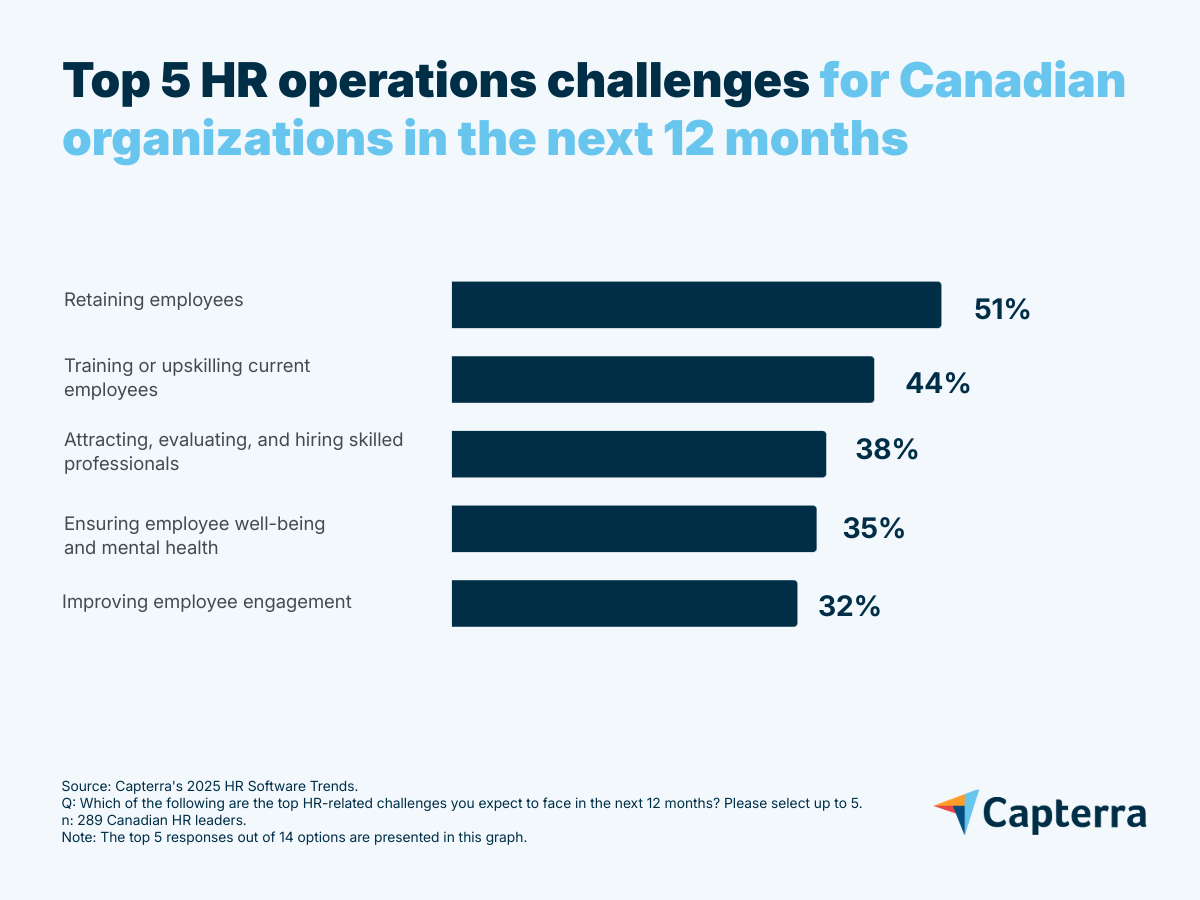
- Over half of Canadian HR pros (51%) say retention is their top challenge in the next 12 months—relatively more than upskilling (44%) or hiring (38%).
- 48% expect to increase their workforce in the next 12 months.
- 54% foresee recruiting costs increasing compared to last year.
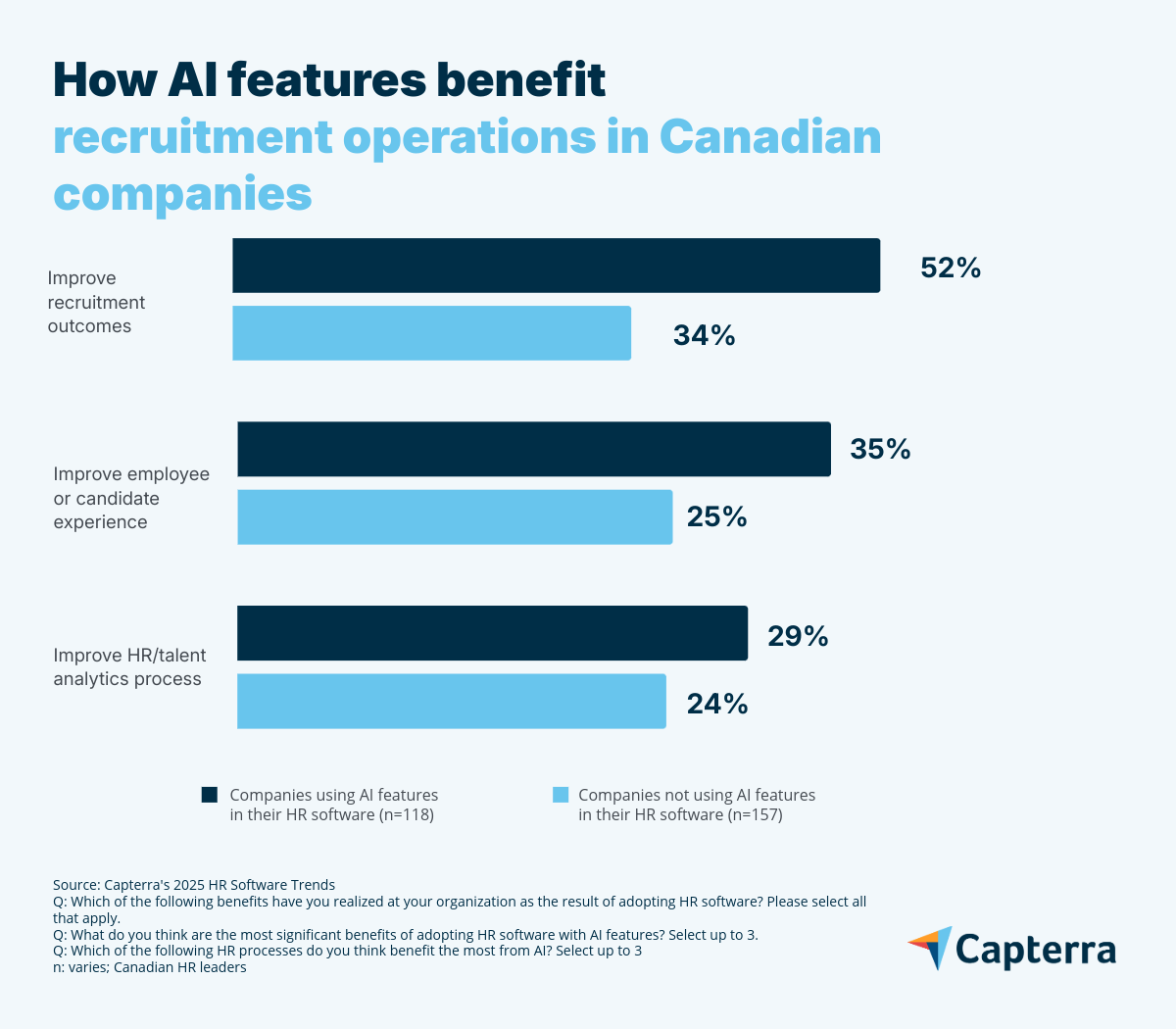
- Payroll (29%), followed by recruiting, and HR analytics are the processes that benefit most from AI.
Why it matters
Efficiency is critical when you have less budget and fewer resources, and that's where software can help. Nearly half of Canadian HR leaders anticipate that their organization’s workforce will grow in the next 12 months, but only 41% consider recruiting software critical, despite it being one of the top challenges for organizations.
Tech alone isn’t enough. AI-powered HR tools boost recruiting and improve candidate relationships, but soft skills are still key to engaging applicants and personalizing the experience.
The opportunity
AI-driven recruiting cuts costs and improves hire quality by automating routine tasks and freeing recruiters' time to build meaningful candidate relationships. It optimizes the identification of effective job posting sources and the selection of compatible candidates.
"AI can really help take over some of the more routine tasks. For example, the first initial screening interview, where you're getting the basic details from these job applicants. We're seeing chatbots taking over this step, which is really helpful, because the recruiters can then focus on those more tailored experiences for candidates further down in the pipeline."- Brian Westfall
Recommendations:
- Upgrade recruiting software/ATS with AI features to refine and speed up the early stages of applicant screening.
- Implement AI features in HR/talent analytics to enhance data analysis and candidate evaluation.
- Focus on candidate experience by continuously training your recruiters in soft skills.
-
When implementing AI in recruitment, consider:
- Using AI to support the process, not replace it: candidates still value human interaction and decision-making.
- Being transparent about how AI is used in the hiring process.
- Prioritizing candidate experience by offering the option to connect with a human recruiter.
- Learning How To Strike The Right Balance With AI In The Hiring Process.
Software solutions
HR talent analytics: These tools help analyze recruitment data and identify compatible applicants. AI features enhance candidate evaluation by providing predictive insights and automating data analysis. 37% of Canadian HR leaders rate this type of software as critical to their HR operations.
Recruiting software and ATS: Both software streamline the talent acquisition process, from sourcing to selection. AI features further improve efficiency by automating resume screening and enhancing candidate matching. 41% of Canadian HR leaders say these types of software are critical to their HR operations.
Key Insight 2: Interconnected Work Requires Continuous Upskilling
The challenge
Upskilling is critical in an increasingly interconnected work environment, and 44% of Canadian HR leaders say they expect to face this challenge in the next 12 months. Moreover, organizations will also have to deal with complex software integration and enhance employees' AI skills.
According to Gartner’s report “Quick Pulse: Leader Sentiment on Skills Gaps,” [2] organizations are increasingly concerned about emerging skills gaps and their potential impact on performance and growth goals. 78% of global HR leaders are worried about skills gaps at their organizations, and 56% are most concerned with deficiencies in digital skills. So, part of the challenge is also to identify where these gaps are.
"Identifying skills gaps in an organization can be hard, and you have to do that work in order to understand where to focus your efforts with your training and learning programs."- Brian Westfall
What Canadian HR leaders tell us
- 44% cite training and upskilling current employees as the main operational challenge in the next 12 months.
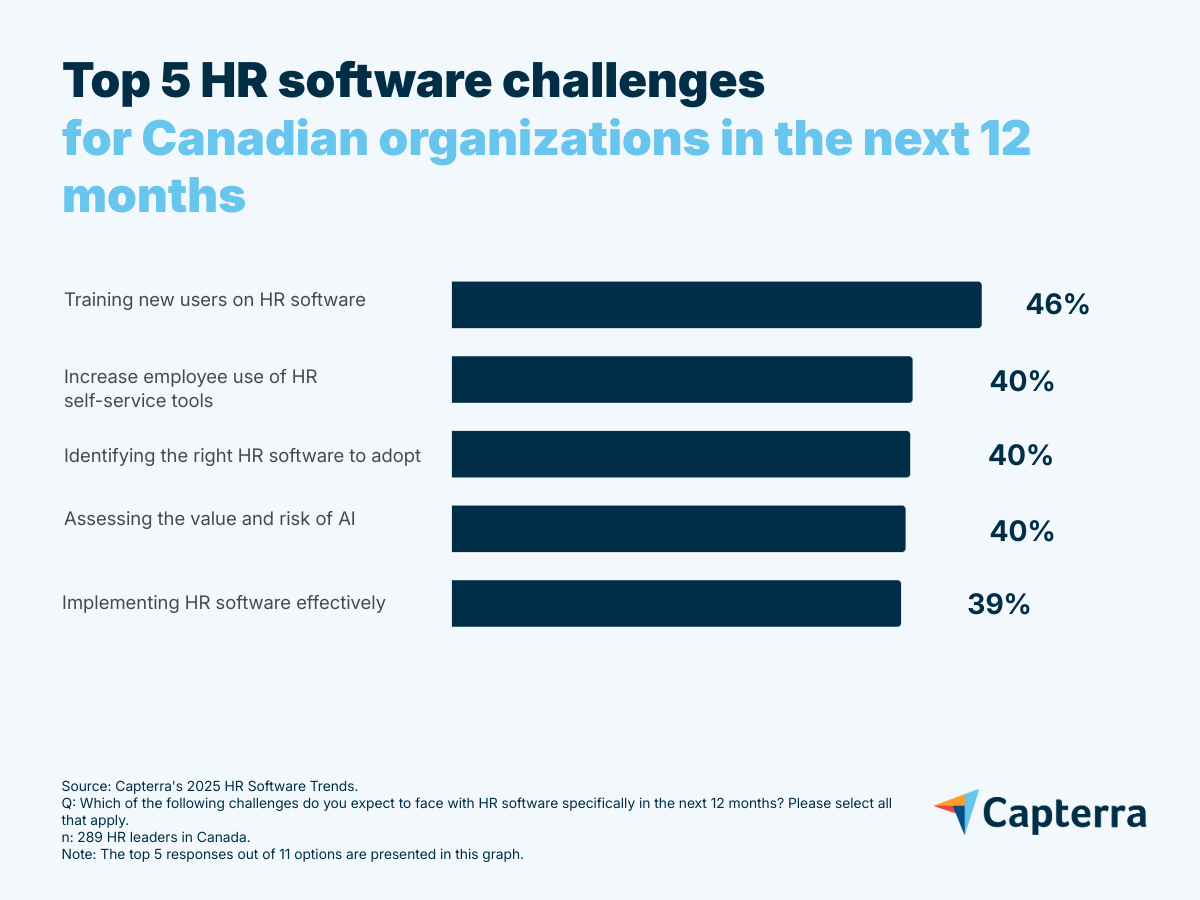
- 46% say training new users on HR software is the main software-related challenge in the next 12 months.
- 63% expect that their training/upskilling costs will increase this year compared to last year.
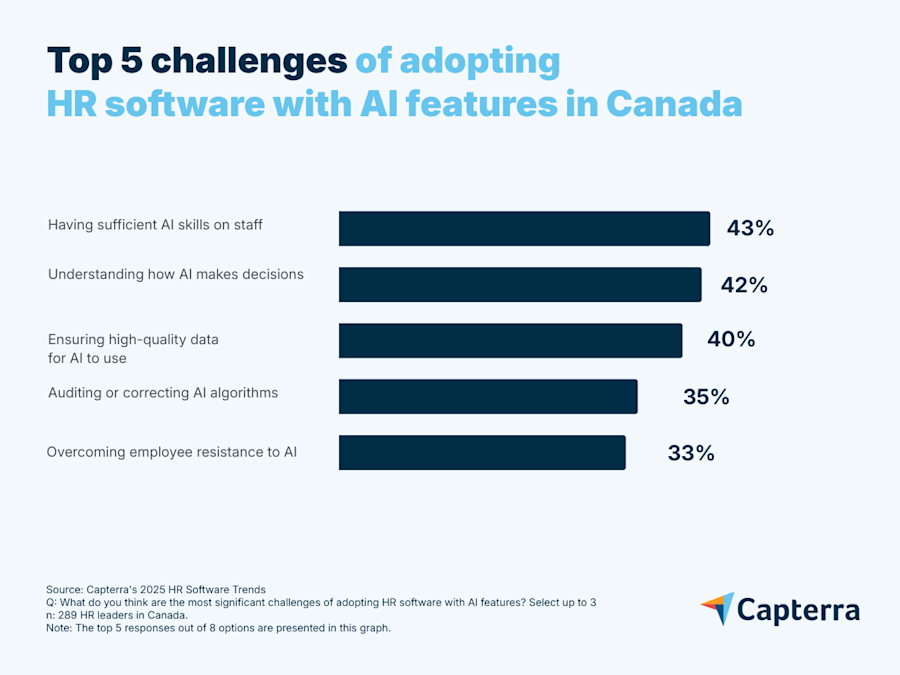
- 43% highlight insufficient AI skills on staff as a challenge when adopting AI features.
Why it matters
Effective integration and skilled staff are crucial as companies juggle multiple systems, averaging four HR tools each. With AI boosting productivity, out-of-the-box software integration, and HR and AI expertise are essential for competitiveness.
Despite 67% of Canadian HR leaders having AI-powered HR tools, only 41% use them, lagging global peers who show stronger adoption.
In addition, Canadian companies are slower to respond to the need for AI skills—many are still debating if AI is hype or a necessity. Still, in “Agentic and AI Kick-Starter for CHROs,” [3] a Gartner report, HR leaders estimate that generative AI (GenAI) will impact 37% of the workforce and the way people work in the next two to five years.
However, only 34% of Canadian HR leaders consider training resources critical when researching software, even when the majority foresee an increase in costs in this field and are aware that they have to upskill their employees.
The opportunity
Organizations can close skills gaps and boost productivity by training employees and using AI to make self-service tools more intuitive and accessible. In the current volatile and uncertain context, upskilling employees can be more productive and faster for companies than looking and hiring for specific roles.
"You see a lot of companies moving that budget from hiring more people towards upskilling, because that is going to be more cost-effective in the long run."- Brian Westfall
Recommendations:
- Develop comprehensive training programs: collaborate with leaders and people managers to create ongoing upskilling initiatives.
- Invest in workforce training technology, focusing on integrations and AI features, and upgrade the software if needed.
- Regularly monitor the effectiveness of integrations and employee performance/skills. Ensure current or upgraded software integrates with the company's HR tech stack.
- Leverage talent management/analytics to ensure smooth software integration and optimize AI capabilities.
Software solutions
Human resources information system (HRIS): This type of tool centralizes HR data and supports integration with other systems. AI features help automate data sync and enable real-time insights. 43% of Canadian HR leaders rate this type of software as critical to their HR operations.
HR/talent analytics: These tools help identify and address employee skills gaps. AI features can help design personalized upskilling paths. 37% of HR leaders in Canada rate this type of software as critical to their HR operations.
Learning management system (LMS): This kind of system supports ongoing training and upskilling in HR software and AI skills. AI features can help create content and templates and personalize the user experience. A third of Canadian HR leaders rate this type of software as critical to their HR operations.
Key Insight 3: Technology Boosts Employee Engagement
The challenge
Boosting employee engagement and retention is a top priority for HR leaders. Identifying areas to improve within the employee experience is key, as it drives engagement and, in turn, increases retention.
"Engagement and retention are always going to be one of the biggest priorities for any HR department in any organization. It comes down to really looking at the entire employee experience. Because employees will leave an organization for a lot of different reasons."- Brian Westfall
Using and efficiently integrating tools like compensation software, employee engagement, and benefits administration is crucial for creating a motivated and committed workforce.
What Canadian HR leaders tell us
- 32% cite improving employee engagement, and 51% highlighted retaining employees as HR challenges for the next 12 months.
- 33% of users who use AI features in HR software report that they help increase employee satisfaction or engagement, compared to 22% of companies that do not use AI features.
- 39% of AI features users in HR software report that they help increase employee retention, compared to only 26% of non-users of AI features.
Why it matters
Retaining and engaging skilled employees is key as they are valuable assets who not only perform well but can also train others and drive organizational success. Losing them would mean incurring additional recruitment and training costs and efforts. It is essential to focus on strategies that keep key employees motivated and committed by enhancing their overall experience within the organization.
"Engagement and retention are always going to be a priority, right? When times are good, there are many job opportunities that give employees an excuse to leave one organization for another. And then, when industries are struggling, that's also an excuse for employees to leave that industry. So companies are always hyper-aware of how to engage and retain their employees."- Brian Westfall
The opportunity
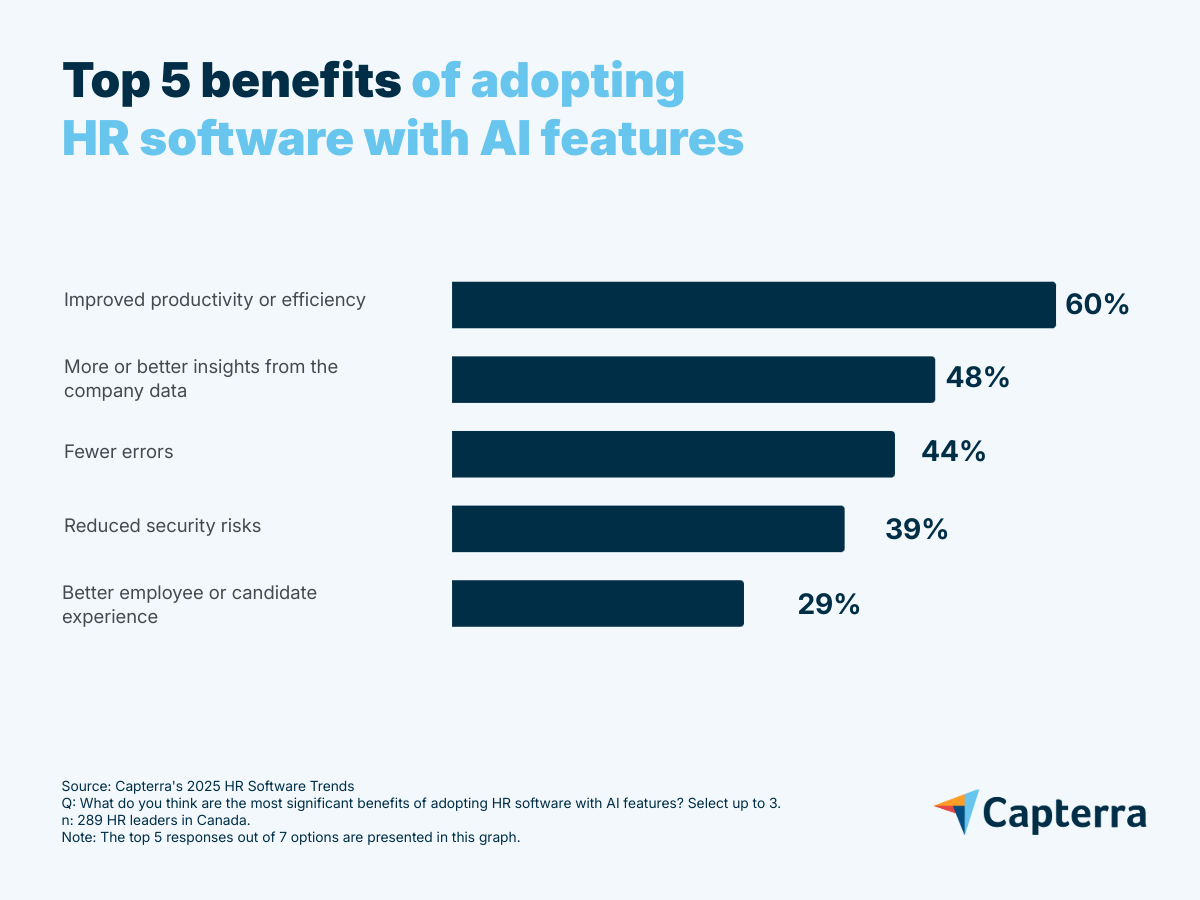
By leveraging technology, organizations can significantly enhance employee engagement and retention. Adopting HR software has led to higher satisfaction and retention rates, while AI features enable the software to provide better insights and, ultimately, enhance employee experience.
Recommendations:
- Brian Westfall recommends regularly conducting surveys to assess engagement levels, pinpoint areas for improvement, and continuously monitor the employee experience (benefits, learning, and growth opportunities). This can help develop plans to enhance employee engagement.
-
According to Gartner’s “2025 HR Technology Employee Experience Bullseye” report [4], to improve employee experience, HR leaders should:
- Identify which HR tasks employees prefer to handle in person versus through self-service platforms to better meet their needs and enhance their experience.
- Invest in internal career sites and talent marketplaces to support career growth and retention.
- Focus on user-friendly HR tech to conveniently gather employees' sentiment.
- Promote well-being tool adoption by tailoring offerings to generational preferences, with a focus on mental well-being tools for millennial and Gen Z employees.
-
To support employee retention, HR leaders can leverage the following strategies:
- Use performance management software to analyze employee performance, recognize and reward them accordingly with compensation management tools.
- Use benefits administration software to offer personalized advantages that meet employee needs and maintain work-life balance.
- Leverage talent management software to provide growth opportunities, encourage skill development, and foster career advancement, keeping top talent committed. Employees are more likely to stay engaged with the organization if the management supports their career paths and helps them develop their skills.
Software solutions
Compensation management software: Design competitive pay structures to retain skilled employees. AI can help you benchmark compensation against market data and predict turnover risks based on pay satisfaction. 40% of Canadian HR leaders rate this type of software as critical to their HR operations.
Employee engagement software: Foster morale and recognize employee achievements. AI-driven nudges and recognition algorithms can help managers engage employees more consistently. 40% of HR leaders in Canada rate this type of software as critical to their HR operations.
Survey software: Collect employee' feedback on what they need to feel more engaged. AI features can analyze sentiment and discover patterns in employee concerns.
Key Insight 4: AI in HR Technology Demands Risk Mitigation
The challenge
Among Canadian HR leaders, 39% are concerned about effectively implementing HR software, while 40% worry about assessing the value and risks of AI. Aside from having skilled staff, the main concerns regarding AI are understanding how AI makes decisions, obtaining quality data, and auditing or correcting AI algorithms.
Organizations must understand the risks associated with AI, as it will handle information provided from multiple sources (e.g., employees, clients, other software). Skilled employees and the right technology and processes will ensure data integrity.
"You don't want to rush with AI. You want to implement and use those features when you're ready as an organization because you don't want to have AI working off bad data. You don't want your users using AI for things that they shouldn't."- Brian Westfall
What Canadian HR leaders tell us
- 39% say effective HR software implementation is a challenge.
- 40% are concerned with assessing AI's value and risks.
- 60% consider security a critical feature when researching HR software to acquire and implement, while 46% report that security concerns triggered HR purchases last year.
- 42% of AI users say reducing security risks is a benefit of adopting HR software with AI features.
Why it matters
AI features must rely on high-quality data and compliance, making data protection and an understanding of AI decision-making crucial for minimizing risks. Successful HR software implementation prevents disruptions and secures data. Efficient integrations protect privacy by reducing vulnerabilities. AI literacy is key to understanding how AI works.
Jonah Shepp, Senior Principal, Research, at Gartner, warns that AI, especially generative AI, poses privacy, intellectual property, and trust risks. HR leaders should address these, as employee behavior is key to preventing data leaks, which could have serious legal and reputational impacts. [5]
The opportunity
Implementing software properly, maintaining data quality, and understanding how AI works all help mitigate AI risks. HR software with AI features helps reduce security risks, but auditing AI algorithms and providing effective data privacy and management are also crucial for protecting sensitive information and ensuring compliance.
Eser Rizaoglu and Stephanie Clement, both Senior Director Analysts, state in Gartner’s “Agentic and AI Kick-Starter for CHROs” report [3] that cultivating AI literacy—the knowledge and skills to effectively work with AI—is essential for successfully scaling AI within an organization. Without it, organizations are unlikely to achieve value creation with AI.
Recommendations:
- Ensure staff effectively use HR software integrations and understand AI functionalities; implement training programs if necessary.
- Build a culture of transparency, learning, and collaboration to ease employees’ resistance to AI—showing it’s a tool for empowerment, not replacement.
- Conduct comprehensive data audits to verify data quality, correct usage, and alignment with business expectations.
- Revise data policies to ensure high-quality input and compliance with privacy rules, crucial for both general and AI-enhanced systems.
- Upgrade security features in HR software to safeguard employee data and manage AI-related risks; consider changing the product if necessary.
- Establish clear usage guidelines and regularly assess software functionality and ease of use to improve productivity and reduce user errors.
Software solutions
HR/talent analytics: Leverage these tools to analyze and improve employee data governance policies aligned with AI data usage. AI features can generate role summaries and risk insights to help organizations quickly evaluate whether user-role assignments are appropriate and compliant. 37% of Canadian HR leaders rate this type of software as critical to their HR operations.
Learning management system (LMS): Use LMS tools to train employees on data collection and AI usage. AI can personalize learning paths based on employee roles and knowledge gaps, ensuring targeted upskilling in data and AI literacy. 83% of HR leaders in Canada rate this type of platform as important to their HR operations.
Data management software: Manage and ensure the quality of data used for the HR software and AI applications. AI features can automate data cleansing and validation processes, reducing human error and ensuring high-quality inputs for AI systems.
Data privacy software: Monitor and enforce adherence to data privacy regulations. AI features help in real-time compliance tracking and automated enforcement of privacy policies.
Adapting HR to Technological Shifts
The future of HR will be defined by how well organizations adapt to rapid technological change and evolving workforce needs. Embracing AI, prioritizing upskilling, and safeguarding data are now essential for success. HR leaders who act on these trends will be better equipped to attract, develop, and retain top talent. By keeping people at the center of every tech decision, organizations can thrive in an increasingly complex world.
Note: The applications mentioned in this article are examples to show a feature in context and are not intended as endorsements or recommendations.
Sources
- Brian Westfall, LinkedIn
- Quick Pulse: Leader Sentiment on Skills Gaps, by Trisha Rai, February 2025, Gartner
- Agentic and AI Kick-Starter for CHROs, by Eser Rizaoglu and Stephanie Clement, June 2025, Gartner
- HR Technology Employee Experience Bullseye Report, 2025, by Nini Longoria, April 2025, Gartner
- HR Leaders Must Understand the Opportunities and Risks of Adopting AI and GenAI Technologies: Act Now to Prepare for the Future of Work, by Jonah Shepp, December 2024, Gartner
*Methodology
Capterra's 2025 HR Software Trends Survey was conducted in April 2025 among 3,256 respondents in Australia (n=278), Brazil (n=300), Canada (n=289), France (n=300), Germany (n=300), India (n=294), Italy (n=300), Mexico (n=300), Spain (n=300), the U.K. (n=296), and the U.S. (n=300). The goal of the study was to understand the HR software that companies are buying, their benefits and challenges, and the impact of AI on HR. Respondents were screened for employment at companies with more than one employee, working in management-level roles or above. Respondents were also confirmed to be at least partially responsible for HR software purchase decisions within their organisation.